
vScrawl helps you create a smoother, multilingual e-signature experience with localized language, time zone, and date-time settings. Let signers view and complete documents in a format that feels familiar, clear, and easy to follow.
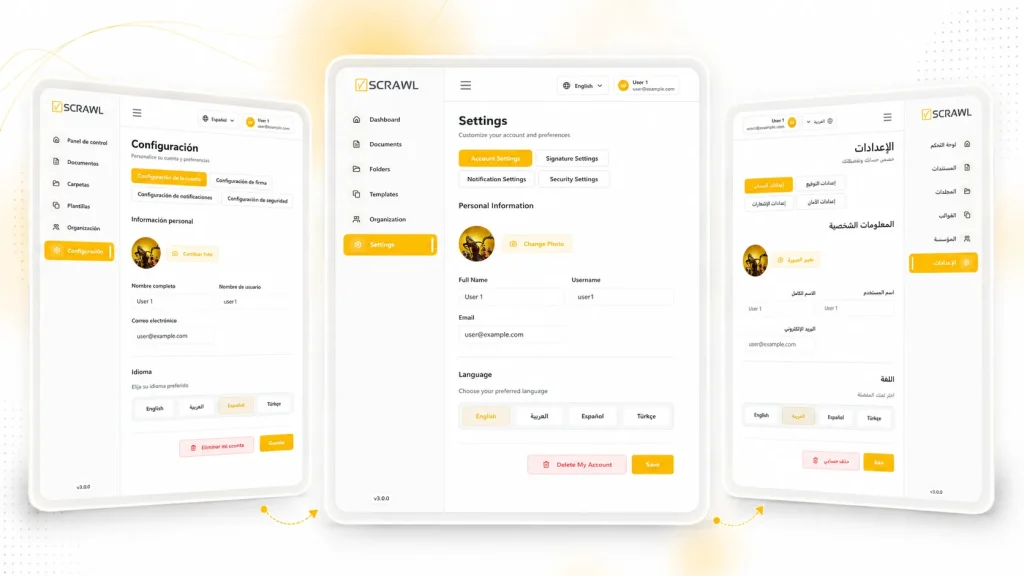
vScrawl makes global eSigning seamless by adapting to each signer’s language, time zone, and preferred date-time format. Ensure clarity and consistency across your organization.
Let signers view and complete documents in their preferred language, improving clarity and engagement.
Set accurate time zones for your organization and individual profiles to keep scheduling precise across regions.
Customize default date and time formats for consistency in all records and communications.
Showcase how vScrawl adapts to different languages and time zones, giving each signer a personalized and intuitive experience. Keep your workflow consistent while making global collaboration easy and efficient
Localization lets signers interact with documents in their preferred language, time zone, and date-time format, making eSigning clear and intuitive.
vScrawl supports multiple languages including English, French, German, and Spanish, and can expand to additional languages based on your organization’s needs.
Yes, administrators can configure a default time zone for the organization, while individual users can adjust their personal time zone settings.
vScrawl allows you to choose standard date and time formats for both organization-wide defaults and personal profiles, ensuring consistency across documents.
Yes, all emails, notifications, and eSignature pages automatically adjust to the signer’s language and date-time settings for a seamless experience.
Yes. Emails, notifications and signing pages adjust to each signer’s own language and date-time settings. One signer can use French while another uses English.
Ask the vScrawl team. vScrawl supports English, French, German and Spanish, and can expand to other languages based on your organization’s needs. Tell us which languages your signers need.
No. Localization changes how signers see the signing process. Legal validity depends on the country’s law and the document type. Read our guide to e-signature laws by country before you send cross-border documents.
Related: Custom Branding | E-Signature for Non-Profit Organizations | Multiple Signers
Guide: Are electronic signatures legal? E-signature laws by country
Set your defaults once. Each signer then gets a familiar experience in their own language.
1. Set organization defaults. Administrators set a default time zone and date-time format for the organization.
2. Let users adjust. Each user can change their own time zone and date-time format in their profile, so dates and times appear the way they expect.
3. Send as usual. Each signer sees signing pages, emails and notifications in their preferred language and date-time format.
4. Keep records consistent. Default date and time formats keep your records and communications consistent.
Signing pages, emails and notifications all follow the same settings, so the experience stays consistent from invitation to completion.
Localization helps wherever signers do not share one language or time zone:
Cross-border contracts. Send agreements to clients and partners in other countries.
Community programs. Serve multilingual donors, volunteers and members.
Schools. Reach families who speak different languages at home.
Global HR. Onboard team members in several regions and time zones.
International vendors. Sign supplier agreements across time zones.
Healthcare. Show patient forms in a language the patient understands.
Enable your signers to work in their preferred language, time zone, and date-time format with vScrawl. Start today to make global document workflows simpler, faster, and more consistent.

Experience the future of document management and signing with our all-in-one solution.
vScrawl is a product of DictaLabs LLC | Privacy Policy | E-Signature Laws © 2026 DictaLabs LLC. All rights reserved.